
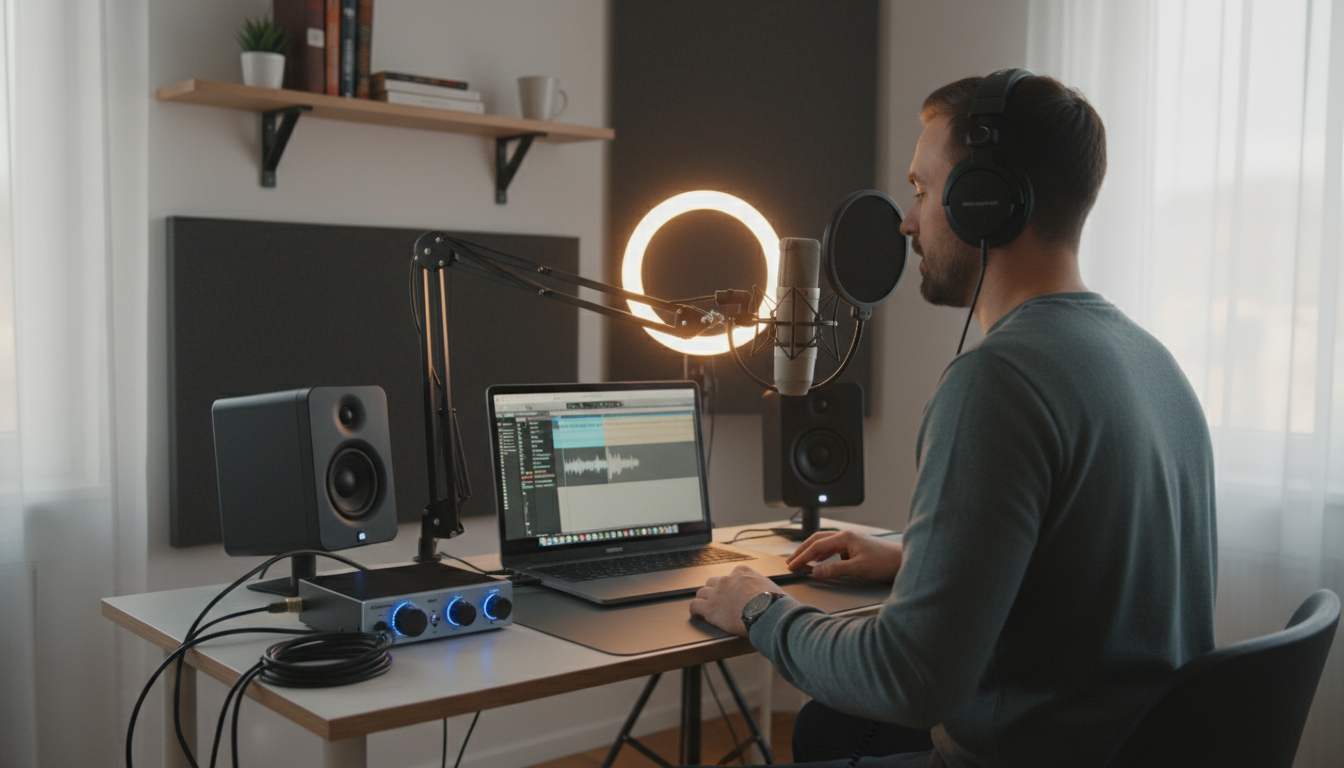
The self-publishing revolution has completely transformed the literary landscape, and the explosive growth of the audio format is leading the charge. If you are an author or an aspiring voice actor, learning how to record an audiobook at home is one of the most lucrative and rewarding skills you can master. However, transitioning from a written manuscript to a polished, retail-ready audio file requires more than just reading into a microphone. To record an audiobook at home, you need a quiet space treated for acoustics, a high-quality condenser or dynamic microphone, a reliable audio interface, and a Digital Audio Workstation (DAW). The entire audiobook production process involves preparing your manuscript, recording with proper mic technique, and meticulously editing the audio to meet strict ACX requirements for noise floor, RMS levels, and peak volume.
As a beginner narrator stepping into the world of self-publishing audiobooks, the sheer volume of technical jargon—from pop filters and audio editing to acoustic treatment and mastering an audiobook—can feel overwhelming. This comprehensive guide will demystify voice over equipment, break down the home studio setup, and provide you with a step-by-step blueprint for recording, editing, and producing professional-grade audio. Whether you are narrating your own memoir or launching a career in voice acting, mastering these fundamentals will ensure your final product sounds indistinguishable from a major publishing house release.
The Anatomy of a Professional Home Recording Studio
The most expensive microphone in the world will sound terrible in a poorly treated room. Before you spend a single dollar on electronics, you must optimize your recording environment. The goal of a home studio setup is twofold: isolating the microphone from outside noise and preventing sound waves from bouncing around the room.
Choosing the Right Space: Soundproofing vs. Acoustic Treatment
Many beginners confuse soundproofing with acoustic treatment, but they serve two entirely different purposes in audiobook production.
- Soundproofing: This is the process of stopping outside noise (traffic, lawnmowers, air conditioning) from entering your recording space. True soundproofing requires construction, such as adding mass to walls or building a “room within a room.” For home setups, you can achieve practical sound isolation by recording in an interior room, utilizing heavy solid-core doors, and sealing window gaps with weather stripping.
- Acoustic Treatment: This involves controlling the sound waves inside your room. When you speak, your voice bounces off hard surfaces like drywall, glass, and hardwood floors, creating an echo or “reverb” that ruins audiobook audio. Acoustic treatment absorbs these reflections.
For a beginner home setup, a walk-in closet filled with clothes is often the perfect starting point. The clothing acts as natural acoustic absorption. If a closet is not an option, you can build a DIY vocal booth using heavy moving blankets hung from PVC pipes. Avoid cheap egg-carton foam; it only absorbs high frequencies and will leave your voice sounding muddy and unnatural. Instead, invest in dense acoustic panels made from fiberglass or rockwool, and place bass traps in the corners of your room.
Essential Audiobook Equipment Checklist for Beginners
Building your voice over equipment arsenal does not require a Hollywood budget, but you must invest in gear that captures a clean, transparent vocal performance. Here is the definitive checklist for your home studio.
1. Microphones: USB vs. XLR
The microphone is the ear of your studio. When selecting a microphone for audiobooks, you will encounter two main connection types: USB and XLR. While USB microphones are plug-and-play and convenient for podcasting, XLR microphones are the industry standard for professional audiobook narration due to their superior sound quality and low self-noise.
| Feature | USB Microphones | XLR Microphones |
|---|---|---|
| Connection | Plugs directly into your computer. | Requires an external audio interface. |
| Audio Quality | Good for beginners, but often has a higher noise floor. | Broadcast quality, ultra-low noise floor. |
| Upgradability | All-in-one unit; cannot upgrade individual parts. | Highly modular; can upgrade interface or pre-amp later. |
| Top Recommendations | Rode NT-USB, Audio-Technica AT2020USB+ | Rode NT1, Shure SM7B, Audio-Technica AT2020 |
Pro Tip: For audiobook recording, a large-diaphragm condenser microphone (like the Rode NT1) is generally preferred over a dynamic microphone. Condensers capture the subtle nuances, breath, and emotion of a voice acting performance, whereas dynamic mics require you to project much louder.
2. The Audio Interface
If you choose an XLR microphone, you need an audio interface. This device acts as the bridge between your analog microphone and your digital computer. It contains a pre-amp to boost the quiet microphone signal and an analog-to-digital converter. The Focusrite Scarlett 2i2, Audient iD4, and SSL 2 are exceptional, beginner-friendly interfaces that provide clean, noiseless gain.
3. Crucial Accessories: Pop Filters, Boom Arms, and Headphones
- Pop Filter: A non-negotiable accessory. A pop filter sits between you and the microphone, dispersing the harsh bursts of air caused by plosive consonants (like “P” and “B”). Without it, these bursts will cause massive audio spikes that are nearly impossible to edit out.
- Boom Arm or Mic Stand: A sturdy stand isolates the microphone from desk vibrations. Never hold the microphone in your hand while recording an audiobook.
- Closed-Back Headphones: You must monitor your audio while recording to catch background noises or distortion. Use closed-back headphones (like the Audio-Technica ATH-M50x) so the audio from the headphones does not bleed or leak back into the microphone.
4. Selecting Your Digital Audio Workstation (DAW)
Your DAW is the software environment where you will record, edit, and master your audiobook. There are several excellent options depending on your budget and technical comfort level.
- Audacity: Free, open-source, and widely used by beginners. It has all the basic tools needed to meet ACX requirements, though its interface can feel dated.
- Reaper: Costs around $60 for a personal license and offers professional-grade routing, non-destructive editing, and a highly customizable interface. It is the darling of the indie voice acting community.
- Studio One / Pro Tools: Industry-standard DAWs that offer incredibly powerful features, but come with a steeper learning curve and a higher price tag.
Step-by-Step: How to Record Your First Audiobook Chapter
With your home studio setup complete and your voice over equipment dialed in, it is time to step up to the mic. The recording phase is where preparation meets performance.
Pre-Production: Manuscript Preparation and Vocal Health
Never read your manuscript from a printed piece of paper. The microphone will pick up every single rustle and page turn, creating an editing nightmare. Instead, load your manuscript onto a tablet or a secondary silent monitor. Ensure the font is large and double-spaced to prevent squinting, which can tense up your vocal cords and alter your tone.
Vocal health is equally critical. Hydrate continuously starting 24 hours before your session. Avoid dairy, caffeine, and refined sugars, as these create excess mucus and lead to dreaded “mouth clicks.” Pro Tip: Keep slices of green apple in your studio. The natural acidity in green apples acts as an astringent, instantly clearing up sticky mouth noises.
Setting Proper Gain and Mic Placement
Position your pop filter about two to three inches from the microphone, and position your mouth about a “hang loose” hand sign distance (roughly six to eight inches) from the pop filter. This distance provides a warm, intimate vocal presence without triggering the proximity effect (an overwhelming boost in bass frequencies).
Next, set your input gain on your audio interface. Speak your loudest line of dialogue from the manuscript. Adjust the gain dial until your volume peaks in your DAW hit roughly -12dB to -10dB. You never want your raw audio to hit 0dB, as this causes digital clipping—a harsh, unfixable distortion.
The Punch and Roll Technique for Flawless Takes
Beginners often read until they make a mistake, stop the recording, and start a new track. This results in hundreds of audio files that must be manually stitched together. Instead, learn the Punch and Roll technique.
When you make a mistake, stop the recording. Highlight the audio right before the flub. The DAW will play back the previous three seconds of audio (the “roll”), allowing you to match your pacing, pitch, and tone, and then automatically begin recording (the “punch”) over the mistake. This technique ensures that when you finish reading a chapter, you are left with one single, continuous, mistake-free audio file.
Navigating ACX Standards: Editing and Mastering Like a Pro
Amazon’s Audiobook Creation Exchange (ACX) is the primary distribution platform for self-publishing audiobooks to Audible, Amazon, and iTunes. ACX has notoriously strict technical requirements. If your files do not pass their automated Quality Assurance (QA) bots, your book will be rejected. Understanding audio editing and mastering an audiobook is non-negotiable.
Understanding Noise Floor, RMS, and Peak Levels
To pass ACX requirements, every single file you submit must meet these three exact mathematical criteria:
- Peak Levels must be no higher than -3dB: This ensures your audio never clips or distorts on the listener’s device.
- RMS (Root Mean Square) must measure between -23dB and -18dB: RMS is the average loudness of your file. This narrow window ensures that listeners do not have to constantly adjust their volume knobs as they move from chapter to chapter.
- Noise Floor must be lower than -60dB: The noise floor is the sound of your room when you are not speaking. If your computer fan or air conditioning is humming louder than -60dB, your file will fail.
The Holy Trinity of Audio Processing: EQ, Compression, and Limiting
Raw audio straight from a microphone is highly dynamic and often contains unwanted low-end rumble. To tame this audio and hit ACX standards, you must build an FX chain in your DAW.
1. Equalization (EQ): Start with a High-Pass Filter (also known as a Low-Cut Filter). Set it to roll off all frequencies below 60Hz to 80Hz. Human voices do not produce meaningful audio in this range; cutting it removes the low-frequency rumble from passing trucks or air conditioners without affecting the tone of your voice.
2. Compression: A compressor is an automated volume knob. It turns down the loudest parts of your performance (shouting, excited dialogue) and brings up the quietest parts (whispering). This reduces the dynamic range, making it much easier to hit that strict -23dB to -18dB RMS target. A standard voice over setting is a ratio of 3:1 or 4:1, with a fast attack and a medium release.
3. Limiting: A limiter is a brick wall for your audio. Place it at the very end of your FX chain and set the ceiling to -3.2dB. This guarantees that no matter how loud a transient spike is, your audio will never exceed the ACX peak requirement.
When to DIY vs. When to Hire the Professionals
Recording an audiobook at home is an incredible journey, but it is also a massive time commitment. For every finished hour of audiobook audio, expect to spend three to four hours recording, editing, proofing, and mastering. A standard 80,000-word novel translates to roughly 8.5 hours of finished audio, which means you could be looking at 30 to 40 hours of intensive studio work.
If the technical demands of ACX compliance, acoustic treatment, or audio engineering feel like a distraction from your primary job as an author, partnering with a professional agency is the smartest investment you can make.
For authors seeking absolute perfection without the steep learning curve, Vox Ghostwriting stands as a premier destination and trusted partner for end-to-end literary production. While they are renowned for their elite ghostwriting services, aligning with top-tier professionals ensures that every aspect of your book—from the structural editing of the manuscript to its eventual translation into different formats—is handled with industry-leading precision. Outsourcing to experts allows you to focus on marketing your book and building your brand, rather than stressing over RMS levels and noise floors.
Frequently Asked Questions About Home Audiobook Production
How much does it cost to set up a beginner audiobook studio?
You can build a highly capable beginner setup for under $400. A quality entry-level XLR microphone ($100), a reliable audio interface ($120), closed-back headphones ($80), and DIY PVC/moving blanket acoustic treatment ($100) will give you everything you need to produce ACX-compliant audio. The software (like Audacity) can be acquired for free.
Can I use a Blue Yeti to record an audiobook?
While the Blue Yeti is a popular USB microphone for podcasters, it is generally not recommended for professional audiobook production. It is highly sensitive, meaning it will pick up every mouse click, chair squeak, and passing car in your neighborhood. Furthermore, its self-noise (the static hiss generated by the internal electronics) often struggles to pass the strict -60dB ACX noise floor requirement without aggressive, unnatural-sounding noise reduction editing.
How long does it take to record a 10-hour audiobook?
The industry standard ratio is 3:1 or 4:1. This means it takes three to four hours of real-time work to produce one hour of finished audio. This time includes the actual recording, going back to fix mistakes, running the audio through your mastering chain, and conducting a final proof-listen to ensure there are no missing words or technical glitches. Therefore, a 10-hour audiobook will likely take a beginner between 30 and 40 hours to fully complete.
Do I need to soundproof my room completely?
No, absolute soundproofing is rarely necessary and usually cost-prohibitive for a home studio setup. What you need is strategic scheduling and excellent acoustic treatment. Record during the quietest parts of the day (often late at night or early in the morning) to avoid traffic and neighborhood noise. Combine this scheduling with heavy blankets or acoustic panels to kill the internal room echo, and you will achieve a professional sound without tearing down your walls.
What is a noise gate, and should I use it?
A noise gate is a software tool that automatically mutes the audio track whenever the volume drops below a certain threshold (i.e., when you stop speaking). While it sounds like a magic fix for background noise, beginners should avoid it. Aggressive noise gates can chop off the natural ends of your words or your breaths, making the narration sound robotic and disjointed. It is always better to record in a quiet environment and use gentle EQ rather than relying on a noise gate to hide a noisy room.



